Each coworker signs in with the email you invited.
NewPages that save data →
PRIVATE TEAM APPS
Your coding agent built the app. Spryloom puts it in front of your team.
Publish from Claude Code, Codex or Cursor with one command. Your coworkers sign in with their work email and use it from a link. Hosting, sign-in, a database and email come built in.
Works withClaude CodeCodexCursor
youMake a checklist for our month-end close
✓Built Month-end close
$ spry publish
✓hosting ✓sign-in ✓saved data
●Liveclose.acme.spryloom.app
Megan invited you to Month-end closeOpen the link, sign in with this email
ESA
The finance team signed inusing it from a browser
THE HARD PART
Your agent built the app.
Sharing it is the hard part.
It runs on your laptop, where only you can open it. Putting it online means hosting, a database, login code and email. Most hosts give you a public address anyone can find.
The usual route
localhost:3000Only you can open itWith Spryloom
One commandspry publish
Invite by emailno accounts to create
Only they get inchecked before your app
No servers. No login code.
HOW IT WORKS
From one sentence
to your whole team.
Megan runs the month-end close at a 40-person company: 23 steps, five people, and a spreadsheet nobody trusts. Here is the fix, from the first ask to the whole finance team.
- 1
Ask
“Make a checklist for our month-end close, and publish it for the finance team.”
Your agent builds it in Claude Code, Codex or Cursor, the way it builds anything else.
Your coding agent
Make a checklist for our month-end close: the 23 steps, who owns each, and a tick when it’s done. Publish it for the finance team.
✓Built Month-end close
build - 2
Publish
One command, and it’s live at a private address.
Spryloom adds hosting, HTTPS, sign-in and somewhere to keep its data. No servers to set up, no login code to write.
close.acme.spryloom.app● LiveHosting and HTTPS✓
Sign-in for invited people✓
Its data, kept✓
- 3
Share
The team gets an email, signs in with it, and starts ticking off steps.
Nobody else gets in. Every tick shows who made it and when, because Spryloom knows who signed in.
✉ Megan invited you to Month-end close
Open the link and sign in with this email.
October closeBank reconciliationEmily · Mon 10:12Done
Payroll accrualSam · Mon 15:40Done
Revenue recognitionAlexOpen
WHAT YOUR TEAM SEES
An email, one tap,
and they’re in.
These are the real screens. Megan invites Emily to the month-end close; this is everything Emily sees, from the email to the checklist.
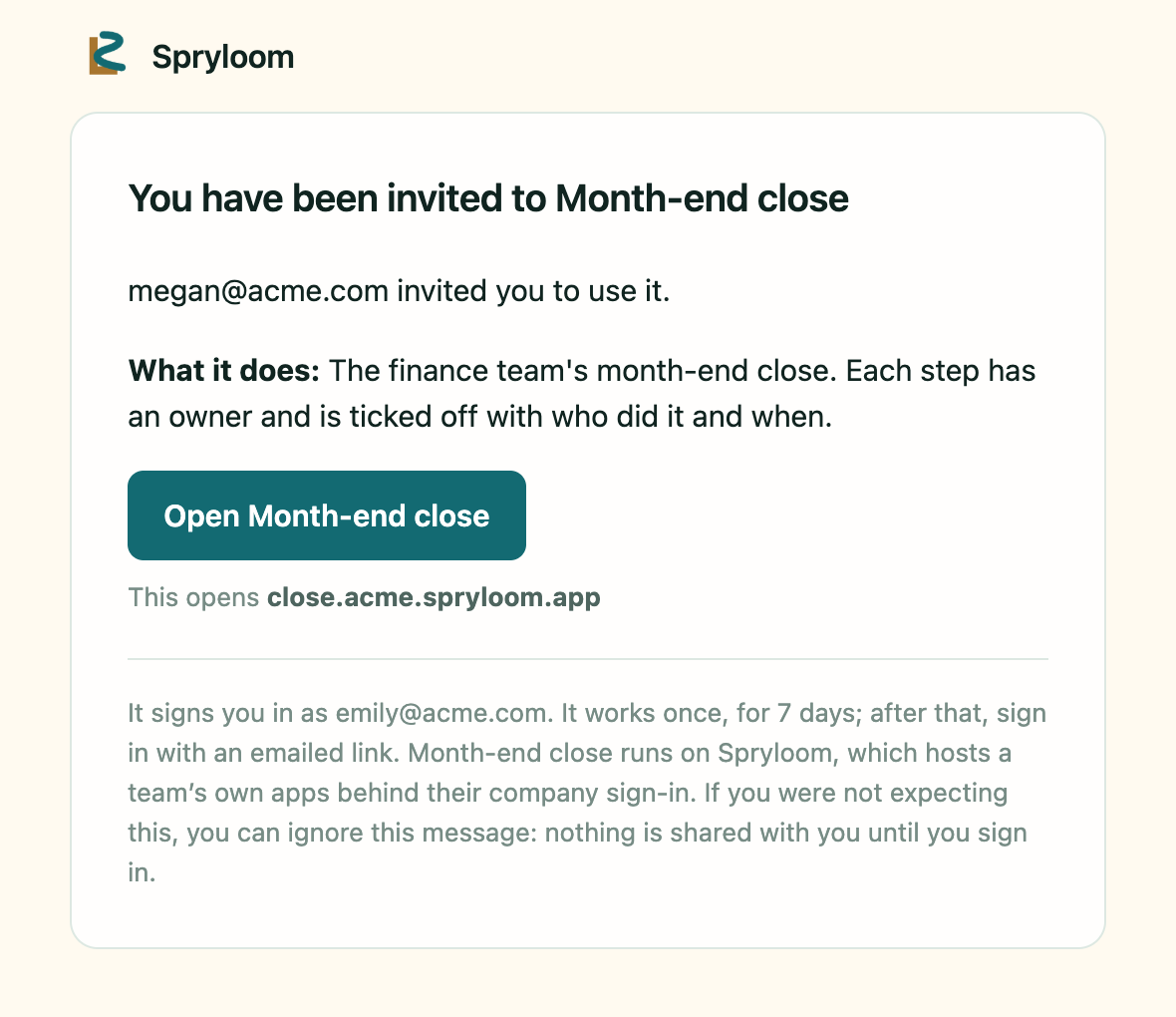
1An email from SpryloomWho invited them, what it does, and one button. No account to create.
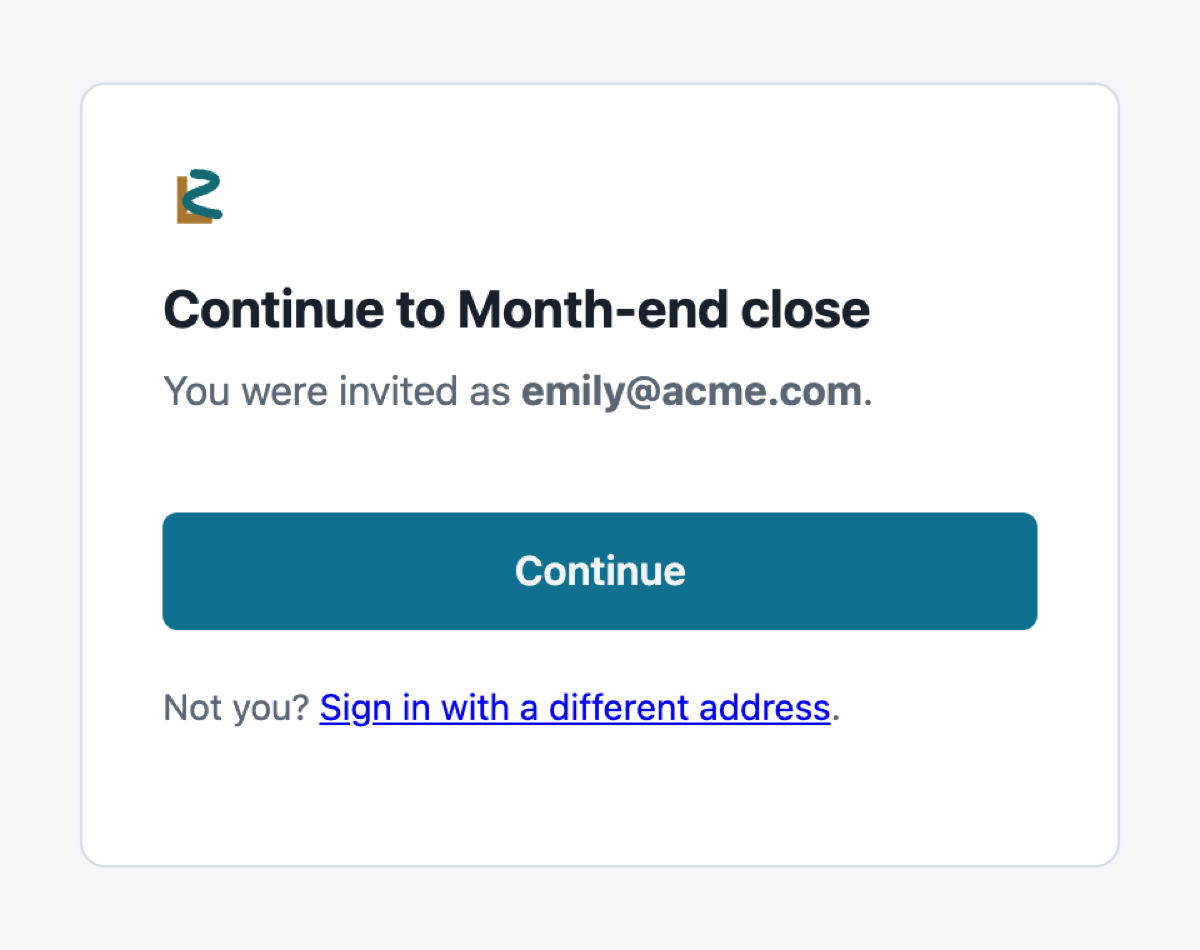
2One tap to sign inThe button signs them in as the address it was sent to. No password.
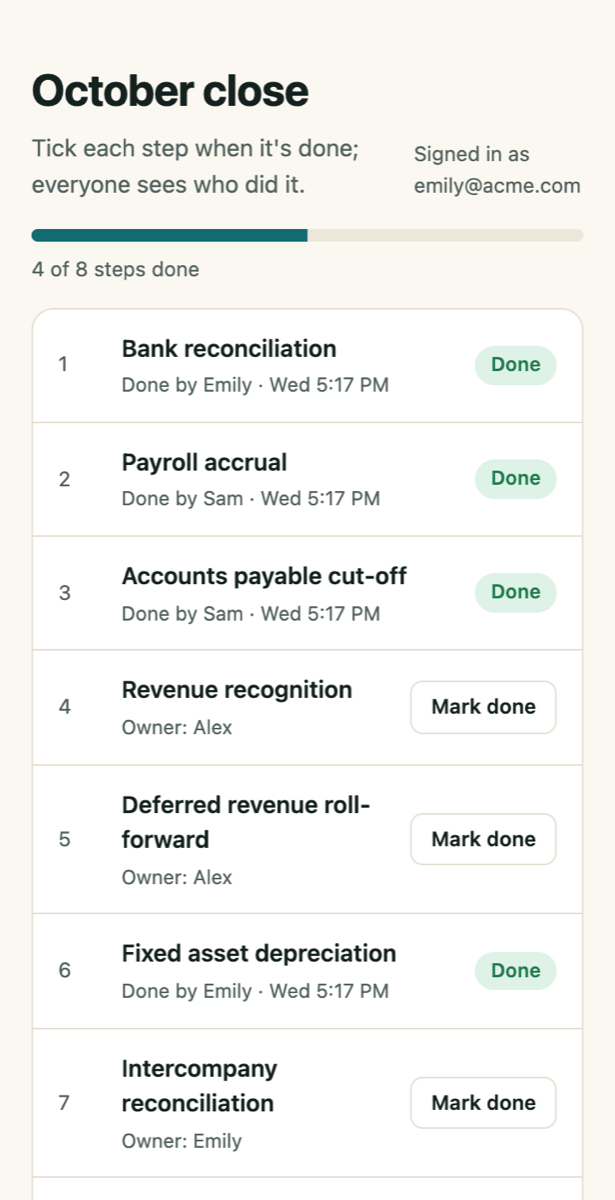
3They’re inOn a laptop or a phone. Every tick shows who made it, from their sign-in.
PRIVATE BY DEFAULT
The link opens.
The door stays controlled.
Most hosts give you a public URL and leave login to your code. With Spryloom, only people you invite get in, and each one signs in by email before your app sees them.
Invite your whole team. No per-seat fees.
Each of these claims is checked by a script that tries the attack.
How access works →AInvited teammatealex@company.com
email sign-in
✓Spryloomidentity checked
signed identity
▣Your appits own database
?Not invitedanyone@else.com
✕Stopped herenever reaches your app
PAGES
Not every tool
needs a server.
A report publishes as a page in seconds. A checklist or a sign-up sheet is a page that saves data. When it needs more, it becomes an app at the same address. See the month-end close, step by step →
- 1A page
Reports, documents, prototypes
Live in seconds - 2A page that saves dataNew
Checklists, sign-offs, sign-up sheets
Live in seconds - 3An app
Reminders, email, outside services, rules on a server
Its own server and database
WHEN IT GROWS
When it needs more,
it becomes an app.
“On day three, email whoever still has a step open” needs a schedule. Your agent adds a server, and the app gets its own database, reminder jobs, email and outside services.
WEEKDAYS 9:00The reminder job runs
EMAIL TO ALEX“2 requests are waiting for you”
SLACK · #OPS“Meeting-room monitor replaced ✓”
Your data stays when you publish an update.
“Weekdays at 9, email Alex what is waiting on him.”
Assignment and overdue emails, with a button back to the app.
Post to Slack, ask an AI model, update a sheet.
Coworkers use it from a link in their browser.
Services it can reachSlackOpenAIAnthropicGeminiStripeGitHubLinearNotionAirtableHubSpotGoogle Sheets
For now a job runs at most twice a day, an app sends at most 5 emails a day, and anyone can mute an app’s email with one link. Jobs and email →
ADD IT TO YOUR AGENT
One setup step,
then just ask.
Your agent gets the tools to publish, invite coworkers, read logs and roll back. Then say “publish this for my team”. Getting started →
Claude Code
The plugin adds the Spryloom skill and its tools.
/plugin marketplace add spryloom/claude-plugin
/plugin install spryloom@spryloom
Codex
Add Spryloom as an MCP server.
codex mcp add spryloom -- npx -y spryloom mcpCursor and other MCP clients
Add this to .cursor/mcp.json, or your client’s MCP settings.
{ "mcpServers": { "spryloom": { "command": "npx", "args": ["-y", "spryloom", "mcp"] } } }The first time you publish, your agent asks for your email and signs you in. Or sign in from a terminal
npx spryloom login --email you@company.comEXAMPLES
See the work,
not the infrastructure.
Pick a common team problem. Watch scattered messages become a clear, shared flow. More examples →
Before
Requests disappear in chat
With Spryloom
Every request gets an owner
ACTIVE ITEM
Replace meeting-room monitor
The screen cuts out during calls. Can we replace it before Friday?
AAlexIn progress
UpdateReplacement ordered. I’ll set it up tomorrow.
ON ITS OWN · Weekdays at 9:00Alex is emailed the requests still waiting on him
✓Submitted✓AssignedIn progressDone
Or start from your team:
HOW IT COMPARES
Spryloom next to
the usual options.
What each one does for you, and what is left to you.
| Feature | Spryloom | display.dev | Claude sharing | Vercel | Retool |
|---|---|---|---|---|---|
| Runs your agent’s whole app, server code included | ✓ Yes | HTML and Markdown pages | Pages inside Claude | ✓ Yes | Apps built in Retool |
| Publishes a single report or document | ✓ Yes | ✓ Yes | Artifacts, inside Claude | As a public site | — No |
| A database for each app | ✓ Yes | — No | Not stated | A separate add-on | ✓ Yes |
| Scheduled jobs and email | ✓ Yes | — No | Not stated | Jobs; email is yours to add | ✓ Yes |
| Only people you invite can open it | ✓ by default | ✓ Yes | Team and Enterprise plans | Vercel accounts, or a paid password | ✓ Yes |
| Coworkers need no paid seat | ✓ Yes | ✓ Yes | — No | Not stated | — priced per user |
| Works with any coding agent | ✓ Yes | ✓ Yes | Made in Claude | ✓ Yes | Built in Retool |
Checked against each product’s own website on 1 October 2026. “Not stated” means we couldn’t confirm it there. Spot a mistake? Tell us.
QUESTIONS
Before you publish
anything real.
More detail in the privacy policy and how sign-in works.
Do you train AI models on my code or data?
No. Your code, your app’s data and your coworkers’ data are never used to train AI models.
What does Spryloom receive when I publish?
The folder you publish, without any .env files. We keep each version so you can roll back. We don’t read inside your app’s database.
How is this different from Claude’s or Codex’s own sharing?
Those share a page or an artifact. Spryloom runs a whole app with its own database, scheduled jobs, email and roles, and the coworkers you invite don’t need a paid seat anywhere.
Who can open my app?
Only the people you invite. Each one signs in with the email you invited, and Spryloom checks them before your app sees the request. Everyone else is stopped there.
What happens if I switch coding agents?
Nothing changes. Your apps, their data and their users stay with you, whichever agent built them and whichever you use next.
Can I share a report or a document, not an app?
Yes. Ask your agent to publish the HTML or Markdown file, or run spry publish report.html. It becomes a page: no server, it opens instantly, and it sits behind the same sign-in.
Can a page save data without becoming an app?
Yes. A checklist, a sign-off or a sign-up sheet can be a page that saves data. Spryloom keeps its lists, stamps every record with who saved it, and only invited people can open it. When it needs a schedule, email or rules on a server, it becomes an app at the same address, with every record moved in.
Do I pay for every coworker?
No. Invite your whole team. Spryloom is free during the beta, and coworkers who use your apps will never be charged per seat.
GET STARTED
A home for every app your agent builds.
Any agent. Behind your team’s sign-in.
Your apps, their data and their users stay with you, whichever agent built them, and whichever you switch to next.
1Choose one recurring task2Build it with your agent3Invite a few teammates4Add one reminder or email
Free during the beta. Not available yet: file uploads, Google sign-in, and apps anyone can open without signing in.
Questions? hello@spryloom.com
1Add Spryloom to Claude Code, once
/plugin marketplace add spryloom/claude-plugin/plugin install spryloom@spryloomThen restart Claude Code. Using Codex or Cursor? Set it up there.
2Ask it to publish
Publish this for my team. Only people I invite should get in.3Sign in when it asks
The first time, it asks for your email. Spryloom emails you a link with a short code: check it matches and confirm. No password.
No approval and no card.